Rethinking memory

August 7th, 2011

There are currently two major ways in which programming languages deal with memory. One is explicit deallocation (as used by C, C++ and assembly language) and the other is garbage collection, which is used by almost everything else.

Explicit deallocation is generally thought of as being very error prone and difficult to get right, but if your language has good features to support it (like destructors in C++) it can be very nearly as easy as garbage collection. It also has some other advantages over garbage collection:

  1. Less actual memory is needed to accomplish any given task (most garbage collected languages need about twice the memory for any given task as a non-garbage collected language).
  2. Non-memory resources can be cleared up in the same way as memory.
  3. Everything is deterministic (which is not the case if you have a garbage collector running on a separate thread).
  4. Most garbage collectors need to pause your program to work, making them unsuitable for hard real-time systems.
  5. Locality of reference is better preserved, leading to more cache-friendly memory access patterns.

Garbage collection also has it's own advantages:

  1. You never need to deallocate memory explicitly - the computer essentially emulates infinite memory for you.
  2. You don't need to explicitly break (or avoid making) cycles of references - the garbage collector will find them.
  3. With a moving collector, allocation can be much faster (requiring just a pointer increment).
  4. If you can always arrange for garbage collection to happen in time that would otherwise be idle, the system can be faster overall.
  5. With a moving collector, memory fragmentation can be avoided.

Generally I prefer explicit deallocation to garbage collection. This might be because my parents drummed it into me as a child that I should put away my toys when I finished playing with them, not leave them lying around to be tidied away my someone else. The one thing that does bother me about explicit deallocation, though, is the possibility of memory fragmentation. Lately I have been wondering if would be possible to fix this problem whilst retaining the advantages of explicit deallocation. Specifically what got me thinking about this is the crazy memory tricks I implemented for my fractal plotter, and how to generalize it to other programs. The result is something I call ravioli allocation (code here although it doesn't actually do anything at the time of writing).

The idea there is that you have a pile of objects which each take the same amount of memory. So there is a simple algorithm for keeping them defragmented - whenever you deallocate an object, move the highest object in memory into the space it vacated.

There are two difficulties with doing this more generally:

  1. To move object X, you have to know where all the pointers pointing to it are so you can fix them up. This caused many long and painful debugging sessions with my fractal program.
  2. All the objects have to be the same size.

The second problem can be solved if the objects are large enough to hold two pointers, by simulating arrays and structures using binary trees (though access time for elements increases a bit - from O(1) to O(log n)).

The first problem can be solved by linking together in a linked list all the pointers which point to the same thing. The list needs to be a doubly linked list because we need to be able to remove a pointer from the list it's in. So, each "high level" pointer really consists of three "low level" pointers - one to the referent itself and two for the previous and next "high level" pointers in the list. An object itself will also need space for two other "low level" pointers - one to the first element of the linked list of pointers pointing to that object, and one to tell the allocator whether it contains 0, 1 or 2 "high level" pointers (this can also be used as a vtable pointer for other purposes).

To avoid splitting objects across cache lines, we want the size of each object to be a power of two, so they will need to be able to hold 8 "low level" pointers (i.e. be 32 bytes on 32-bit systems, 64 bytes on 64-bit systems). That means that each 32-bit object can store 6 32-bit integers or 24 characters. On a 64-bit machine, an object could store 12 32-bit integers or 48 characters. So the small string optimization is very natural with ravioli allocation.

Once we have the ability to move objects around for defragmentation purposes, we might want to move them around for other purposes too. For example, if we expect that whenever object A is used, object B is also very likely to be used (and vice versa) we might want to put them on the same cache line. We can also set up separate memory arenas for separate purposes and move objects between them to improve locality for paging purposes.

One big downside of this system seems to be that deallocation (or moving an object in general) can be quite an expensive operation - chasing one pointer (and one potential cache miss) for each pointer that points to the moved object. However, I suspect that this wouldn't be as expensive as it sounds most of the time, since the objects that we move will tend to be ones which were allocated recently (since they will be in higher memory locations) and won't have been around long enough to have accumulated too many pointers. The objects that tend to have a lot of objects pointing to them will tend to be long lived and will migrate towards the beginning of memory (even if they don't start off there). However, walking this linked list should probably be done with non-temporal loads to avoid polluting the cache with a bunch of objects that you don't really care about. Also, consider the average case - each object can only point to two other objects, which means that the average number of pointers pointing to an object will be at most 2. And there is the nice property that a routine which doesn't deallocate data that it didn't allocate, also won't move data that it didn't allocate, so performance of small routines can be quantified nicely.

There is a fair bit of overhead to all these linked lists - 44% in the best case (one big array) and 300% in the worst case (a linked list of small records). However, some of this is offset against existing overhead (heap information, vtable pointers, fragmentation, existing binary tree pointers, reference counts[1]) so for real programs the costs might be much smaller or even negative.

Multithreading might seem to be a problem at first - one thread can't hold on to a pointer to an object in another thread's heap. However, you can transfer data to or from another thread if the other thread is in a known (waiting) state. You have to be careful transferring data between threads, but that's true anyway.

Local (stack) variables present a bit of a problem - they can't hold pointers (unless you walk the entire stack looking for pointers whenever you deallocate something). One way would be to store "how to get there" (from a global root object which is allocated first and never moves) instead of "where it is" on the stack. Another would be for the stack itself to be allocated on the heap. This is probably the faster solution, and has some nice implications for implementing things like arbitrary closures and continuations. Hardware support would definitely help here though.

[1] There is a nice synergy between ravioli allocation and reference counting - whenever you change a pointer you remove it from its linked list, and if the linked list then contains zero entries you know you can remove the object you just stopped referencing. Cycles must be explicitly broken, though - you can't have a raw/weak pointer (because it would go stale when the object it referred to moved).

Edit 14th July 2013:

Here's a good rant against garbage collection.

Code blog

August 6th, 2011

It's been a year since I last wrote something here, but I haven't been idle. I made a resolution to write some code every day and commit some kind of functional change to my GitHub repository each day, even if it's just a one line change. So far I've kept to it pretty well (apart from travel days). I'm adding more stuff there all the time, most of it brand new but some of it is stuff that I wrote previously and which hadn't been under version control before (updated to work with the library code I'm also committing). I know my github workflow is rather unusual - lots of projects in one repository and commits corresponding to days rather than to features. But the version control is mainly for my benefit at the moment (since it's just me working on this stuff) - I just want to have all this backed up offsite, to be able to see previous versions and to have a record of what code I wrote when. The current set of subdirectories under of the main repository is:

  • 4to8 - little program I wrote to convert the audio data for the game Fire! by New Deal Productions from 4-bit to 8-bit format so that I could play it back properly.
  • 8088 - various projects relating to the original IBM PC/XT - a cycle-exact emulator and a demo I'm working on.
  • UnityALFE - a compiled language I'm playing about with. This name is a bit overloaded, I might call it ALFE (A Language For Everything) instead.
  • codec - an idea I had for a method of compressing audio with extremely low playback overhead. Doesn't currently work, and I have no idea if it ever will.
  • collage - a program to genarate a header image to use on this blog (not yet finished).
  • crc32 - a handy utility for computing CRC32 checksums of files.
  • crtsim - a CRT simulator.
  • euclids_orchard - a program to generate a Euclid's Orchard image.
  • fractals - some fractal plotter programs. Currently there is only one - a zoomable Bifurcation fractal.
  • image_resample - my custom image resampler.
  • include - various libraries used in multiple projects.
  • intervals - code and simulator for my intervals bar toy that is in progress.
  • multifunction - a program to search for useful multifunction gates.
  • oscilloscope - an oscilloscope program based on an idea I had for rendering waveforms. Not really started.
  • perceptual - a program to find maximally distributed colours in perceptual colour space.
  • primes - prime number experiments.
  • ravioli - an idea I had for eliminating memory fragmentation.
  • run_random - recursively enumerates all files in a directory and then picks one at random to run.
  • strobe - an Arduino program for a strobe light with controllable duty cycle and accurately controllable frequency.
  • test - some unit tests for libraries in the include subdirectory.
  • tone_matrix - the code for my physical tone matrix.

I'll blog more about these in upcoming entries. And I'll try to remember to update this list as I add more projects to the repository.

Politics simulator

August 6th, 2010

I've occasionally thought it would be fun to have a computer game where you start out with some land, some people and some natural resources, and your job is to found a country and run it. You get to write your constitution, set up laws and so on and see how things unfold. You might also play the part of a politician once the country is set up. You might get voted out, which changes the set of powers you have (and makes the main next objective "get back into power"). Maybe there are other countries on the "virtual planet" - you can invade them, embargo them, make treaties with them etc. They have their own objectives. You get problems thrown at you (war, dissent, natural disaster and so on) and have to make changes to your policies to try to keep everybody happy.

Given the similarities between writing laws and writing code, I suspect this might devolve into a "programming game" style activity (albeit with a rather more political type of geekiness). I also suspect that there are so many aspects of human activity that would need to be simulated that making it realistic would be an overwhelmingly large task. But of course it doesn't need to be perfectly realistic to be fun - it may be fun enough with just easy-to-implement large-scale economic features.

Transverse wave

August 5th, 2010

Right after creating the original Simple Harmonic Motion program, I wondered what would happen if you connected lots of masses and springs together in a line. I came up with what I've now translated into this:

Controls are the same - dragging the mouse moves one end of the "string", the leftmost slider (or the + and - keys) controls the tension and the rightmost one (or the < and > keys) controls the friction.

Source code.

Simple Harmonic Motion

August 4th, 2010

Some 14 years ago when learning about second order differential equations, simulating physical systems on computers and simple harmonic motion, I wrote this DOS program which (because it's kind of fun to play with) I have now translated into flash:

The idea is very simple - it's just a mass (the white ball) with a green pen, connected to a point by a piece of elastic (the white line). The point doesn't move except when the mouse button is held down, when it moves to the mouse pointer location. This means that the mouse is essentially the forcing function for a 2D, second-order linear differential equation. Which means that (depending on the parameters) the mass follows the mouse pointer, possibly smoothing out its motion, possibly oscillating around it.

There are two slider controls on the right - the leftmost one (or the + and - keys) controls the tension and the rightmost one (or the < and > keys) controls the friction. Press escape to clear the screen.

Source code.

Virtual physical tone matrix

July 28th, 2010

Here's a virtual version of my physical tone matrix, implemented in Flash, so you can play along at home:

Much of the code is a direct translation from the C code in the non-virtual version, so it works in a way very close to the real thing. Even the sample rate and frame rate are close (though they are not synchronized - it's not a cycle-exact simulation).

Click or drag on the screen to turn the lights on and off.

The knobs are (from top left) sustain, tempo, tuning and volume. Above and between the sustain and tempo knobs is the escape switch, which brings up or closes a menu of funcions. These are, from top left:

  • Sine wave (default)
  • Square wave
  • Triangle wave
  • Sawtooth wave
  • Random wave
  • Pattern editor (default)
  • Coarse waveform editor
  • Fine waveform editor (not particularly useful or easy to use)
  • Tuning editor
  • Miscellaneous editor
  • Save current pattern/waveform/tuning/settings to EEPROM
  • Load current pattern/waveform/tuning/settings from EEPROM
  • Toggle life mode
  • Toggle random mode
  • Toggle microtone keyboard mode

The miscellaneous editor shows 6 rectangles. Clockwise from top-right these are:

  • Patterns per loop (a 5-bit binary number) - if this is not 1, then whenever the pattern reaches the right a new pattern is loaded from EEPROM.
  • Fixed tuning - just disables the tuning knob. This exists in order to allow the tuning to be set more accurately on the non-virtual version, not really necessary on the virtual version
  • Update noise continually - when set, the waveform is continually updated with random data, so all frequencies sound the same. This is slightly different to the "random wave" waveform preset, where the 256 waveform components are initialized with random numbers but then don't change, so there are some audible differences between playing them at different frequencies.
  • Beats per pattern - repeat before the pattern gets all the way to the right, useful for rhythms that don't factor into 16.
  • Sustain override - overrides the function of the sustain knob so that this parameter can be set digitally.
  • Tempo override (a 16-bit binary number) - must be greater than 0x200 to work - smaller numbers are faster).

The EEPROM save/load functions load or save the data for the current editing mode (pattern, coarse waveform, fine waveform, tuning or miscellaneous). To use them, press save or load. The screen then shows the current EEPROM contents. Click on a location to choose where to save to or load from. Depending on the editing mode, 2-8 lights will be lit per "saved file".

Fun things to try:

  • Put the PTM in random mode and light 10-16 lights. Then just sit back and listen to some randomly generated music for a while.
  • Draw a glider or Lightweight spaceship, put the PTM in life mode and turn the tempo all the way up to maximum.
  • Make a horizontal line in pattern editor mode, turn the sustain all the way up so that the sound is continuous, then switch to the coarse waveform editor (which was inspired by this). Click and drag around to move the "sliders" and see what sounds you can make.
  • Make sure the pattern editor is empty and then switch to microtone keyboard mode. The lit lights correspond to the white notes on a piano keyboard - the unlit lights are the frequencies in-between (i.e. it's a 34-TET instrument). Try to play or tune or make some weird music. Trying the different preset waveforms is fun in this mode.
  • (Advanced) Try to create a different tuning such as major scale or chromatic (instead of the default pentatonic) using the tuning editor. Each line of the tuning editor represents a frequency as a 16-bit binary number (LSB on the left), in units of roughly 0.24Hz (16Mhz / 226).
  • (Advanced) Make some patterns and save them in consecutive locations in EEPROM, starting at the top left. Then use the "patterns per loop" setting in the miscellaneous editor to play them back in sequence and make a tune longer than 16 notes.

The copy and paste functions on the right-click menu work and are compatible with the original Tone Matrix applet.

Source code is here.

Map reprojection

July 26th, 2010

Ever wondered what a standard equirectangular projection map of the world would look like if the poles were in different places? Wonder no more! Just click and drag on the map below to move a piece of the world to somewhere else on the map - the rest will follow.

Flash is the best way to do this sort of thing in terms of market penetration, but Actionscript is surprisingly difficult to get started with. Adobe's tools are great, I'm sure, if you want to make animated vector movies but in trying to learn how to use them to do programmatically generated stuff like this I just got lost. Perhaps I just haven't discovered the right bit of documentation. I eventually found this to be a way in to the maze.

I hope to write some more fun little web toys like this in the coming weeks.

Edit: source code.

Credit card designed for internet shopping

July 23rd, 2010

It seems like it would be possible to make a great deal of money by creating a payment system better than credit cards. Paypal has come closest to doing this, but has a lot of problems.

How could one make credit cards better? It would be very difficult to get your payment system into as many retailers as Visa and Mastercard, so perhaps aiming for a niche would be a good idea. One such niche might be internet purchases. Develop a payment system/credit card designed specifically for internet purchases and it could be very popular.

One major difference between a payment system designed for the internet and one predating it is that one could authenticate the transaction, not the identity. Whenever you buy something online, you put in your card number as usual but then (unlike with normal credit cards) there is an extra step - you log into the payment system's website and approve the requested transaction. Until you have done that, the merchant doesn't get any money (and won't deliver the goods). This cuts out all "stolen card" type fraud, since the thief would also need to steal your payment system password (which never goes anywhere near the merchant). This would allow this payment system to undercut the existing credit card issuers and become competitive. Fraud caused by loss of the payment system password would be treated the same as fraud caused by the loss of any other online banking password (which I think varies from place to place).

This system would still need a "chargeback" mechanism to combat fraud from merchants (and mechanisms to combat fraudulent chargebacks) but my impression is that the costs of these are small compared to the "stolen card" costs.

With suitable cellphone applications for authorization, the system could even be used for brick-and-mortar stores as well.

Unlike Paypal, this system would actually be able to lend money like a credit card, it wouldn't need to be linked to a bank account or credit card.

USB device classes and usage pages

July 22nd, 2010

The Universal Serial Bus interface specification includes various fields to specify what kind of device is plugged into a computer, and what numbers correspond to what buttons, lights and so on on the device. All these are documented in the Human Interface Device Usage Tables. When I discovered this, it provided me with some amusement as alongside the normal mice, keyboards, scanners there are some more exotic devices. Section 5, which describes "Simulation Controls" (i.e. standardized controllers for operating various simulators). As well as the ones you'd expect like a steering wheel (Usage ID C8) and a flight yoke (Usage ID 24) there are such controls as "Standard spaceship controls" (Usage ID 04).

I had no idea that spaceship controls were standardized. I suppose it makes sense, so that once you learn how to fly one sort of spaceship you could (in principle, in some sort of emergency situation) have some chance of operaing an unfamiliar craft. Of course, if that emergency situation is being kidnapped by aliens you're probably out of luck as I doubt any alien spaceship designers have read the USB specification documents.

What's even funnier is the "Standard magic carpet controls" (Usage ID 0B). Being a magical (not to mention fictional) mode of transportation, it seems quite amazing that magic carpets have standardized control mechanisms. You'd think the interface would be something as indistinguishable-from-sufficiently-advanced-technology as "just think about where you want it to go", but the USB documents go into quite some detail about how to fly a magic carpet:

Allows a device to be generally classified as one that uses the standard control of a magic carpet. This control is a bar, grasped by both hands, that controls the Yaw, Pitch and Roll of the carpet.

The bar, at which the pilot sits, may be pushed forward or pulled back to cause the carpet to dive or rise, respectively. In the zero position, the carpet is in level flight. Pushing forward on the bar causes the carpet to nose down and generates negative values. Pulling back on the bar causes the carpet to nose up and generates positive values.

Turning the bar turns the carpet. In the zero position, the carpet travels straight ahead. Pulling back on the right side turns the carpet to the right and generates positive values. Pulling back on the left side turns the carpet to the left and generates negative values.

Rotating the bar rolls the carpet. In the zero position, the carpet travels level. Rotating the bar in a clockwise direction rolls the carpet to the right and generates positive values. Rotating the bar in the counterclockwise direction rolls the carpet to the left and generates negative values.

So there you go - now if you find yourself in a Persian golden-age fairy tale, you know how to get around.

Time derivative accounting

July 21st, 2010

Sometimes I think it would make things simpler if, when I logged onto my bank's website, there were two sorts of transactions listed. One would the normal sort: "x dollars paid to y on date z". The other sort would be "x dollars per month paid to y since date z". For example, my monthly mortgage payment would be listed as a single transaction, not a separate one each month.

Certain calculations are much easier when done with time derivative values. For example, interest on my mortgage accumulates daily but the payments are monthly, so to figure out what is actually owed at any time requires a lengthy spreadsheet or complicated program. If the interest accumulated continuously, and the payment also happened continuously, the calculations would be much simpler.

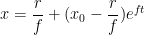
Normally, interest is specified as a percentage by which a debt grows. But to know what that really means, you have to specify how long it takes to grow by that much - this can lead to confusion (deliberate or accidental). It would be much better if interest was specified as a growth constant f (with standard units of Hz, bizarrely enough), such that if you have a debt x_0 at time 0 and changes only because of interest (no payments or fees) then after time t the debt will have grown to xe^{tf}. If you are also making payments at the rate of r per unit time, then the debt x is given by the differential equation \displaystyle \frac{dx}{dt} = xf - r which has the solution

\displaystyle x = \frac{r}{f} + (x_0 - \frac{r}{f})e^{ft}

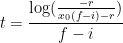
Hence one can easily solve for the time it takes to repay the loan:

\displaystyle t = \frac{log(-\frac{r}{x_0f - r})}{f}

Or you can solve for the repayment rate if you want to repay the loan in a specific amount of time:

\displaystyle r = \frac{x_0fe^{ft}}{e^{ft} - 1}

Similarly, one can do calculations around retirement savings. Suppose you have x_0 in retirement savings today and the inflation growth constant is i. If you are saving at a rate of r e^{it} and investing in something with a growth rate of f, and you want to retire when you can maintain an income of y e^{it}.

The amount you need in savings at retirement is x in:

\displaystyle \frac{dx}{dt} = xf - ye^{it} = xi

Plugging this into the equation for the savings rate while working:

\displaystyle \frac{dx}{dt} = xf + re^{it}

Gives:

\displaystyle y = r+(x_0(f-i)-r)e^{(f-i)t}

Solving for retirement time:

\displaystyle t = \frac{\log(\frac{-r}{x_0(f-i)-r})}{f-i}

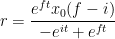
Or savings rate:

\displaystyle r = \frac{e^{ft}x_0(f-i)}{-e^{it}+e^{ft}}

Of course, all that assumes you can get a fixed rate of return and that inflation stays constant. In reality, these variables are constantly changing. There's also the matter of risk to consider - trading off means for variances, but you get the idea.

The current inflation rate is about 300 picoHertz. The highest recorded hyperinflation is about 6000000 picoHertz (6 microHertz).

How should payment rates be specified in user interfaces? "Dollars per month" is probably the most meaningful multiplier - to make it consistent we should use a standard average month length of 2629746 seconds. Current balance would be updated continuously supposing that the paying of salary and recurring bills could also be paid continuously. One would want to take care to set limits on the payment rate for bills (just as one does with direct debits) so that a mistake at the gas company doesn't instantly wipe out your savings.

Further derivatives could be taken into account so that one could pay exponentially increasing bills like the retirement savings above without making any adjustments. The ultimate outcome of this would be to link everything to inflation and display/specify amounts in "year 2000 dollars" (for example) - in other words, the Inflation-linked currency I've written about before.