Archive for the ‘hardware’ Category

80386 microcode disassembled

Saturday, May 23rd, 2026

After I posted 8086 microcode disassembled, Ken Shirriff sent me a high-resolution image of the microcode ROM from the 80386. I didn't expect I would ever do anything with it for a couple of reasons: one is that it's absolutely huge (94720 bits) compared to the 8086 one (10752 bits) so (even with bitract or similar) it would be extremely tedious to transcode and check. The other reason is that I wouldn't know where to start with it - at least with the 8086 there was a patent which gave the general outline and some chunks of code which I could search for. The 80386 was a complete black box. I knew what it did and had a rough idea of how it might work but that turning that into something that I could search for in a big blob of binary seemed like an insurmountable challenge.

Some years later, I was talking to GloriousCow and Smartest Blob (possibly amongst others) on Discord and they mentioned that it would be interesting to get high resolution images of the 80386 die and try to extract the microcode from it. I mentioned that the first part had already been done but that turning the image into a binary blob and a binary blob into intelligible microcode seemed too hard. Well, they may have taken that as a bit of a challenge - they threw various bits of image processing, neural networks, and human-aided automation at the problem and a few days later had the binary blob extracted from the image and cross-checked.

Disassembling it was still quite a challenge, though! We found various patterns and gradually figured out how to rearrange it into μ-ops on one axis and μ-op bits on the other. Then on the order in which to read the μ-ops (helped by a block of unused μ-ops at one end). And how to divide up the μ-op bits into fields. From the 8086 microcode work I assumed that two of the fields would be source and destination registers to copy from. I also knew that the 80386 could do an ALU operation in 2 cycles, suggesting that there had to be a field to specify a second input to the ALU in order that the microcode for these operations could load both operands to the ALU in the first cycle and then the output to the destination on the second cycle. There was also a pattern that occurred with some regularity that we suspected might indicate the end of an instruction (we were right).

Ken helped too by tracing various lines and bits of logic on the 80386 die so that we could see how things were connected up. Gradually the picture become clearer. Each time we figured something out it gave a clue as to the meaning of other chunks of microcode that used the same construct. At the same time we were working on decoding the instruction decoder (which consists of multiple smaller PLAs) and the protection test PLA. Eventually we got to the point where we could associate 386 instructions with chunks of microcode, and things became much clearer.

The 80386 is much faster on a per-cycle basis than the 8086 for most instructions, a feat which it achieves by throwing a lot more transistors at the problem - many algorithms which are implemented by microcode in the 8086 are essentially "hardware accelerated" in the 80386 so I realised early on that more of the 80386 microcode would be setting up these accelerators instead of embodying algorithms directly. Figuring out the interfaces between the accelerators (like the multiply and divide hardware, the barrel shifter, and the protection test unit) and the microcode was a lot of the work.

How many different instructions does the 80386 have, according to the microcode? What are they?

The microcode has 215 entry points from the decoding ROM - quite an increase over the 60 of the 8086! Part of this is new instructions, and part is that instructions are handled by different routines depending on such things as whether their operands are registers or memory, whether the CPU is in real or protected mode, and whether REP prefixes are in operation. I won't list them all here but you can find them in the fields.txt file if you're interested (along with all the subroutines and shared code). It's not very meaningful to list the top-level microcode routine size since many of them do a small amount of work and them jump to a routine shared with another entry point. It's also not meaningful to list the number of opcodes each entry point handles, as the instruction decoder uses more than just the opcode to determine which routine to use.

Are there any instructions not handled by the microcode?

Surprisingly, no! Unlike the 8086 (and also unlike modern CPUs), the 80386 is always executing a μ-op and there is microcode for every instruction.

Does the microcode contain any "junk code" that doesn't do anything?

The routine from 0x849 to 0x856 inclusive (marked as "unused?" in the microcode disassembly) doesn't seem to have any entry points associated with it. I'm not completely sure what it does, but it has a lot in common with the routine #PF (PAGE_FAULT) routine at 0x8e9-0x8f5 - both end up doing an interrupt 0x0e with the error code set to the last error code from the paging unit. But this routine sets CR2 to some mysterious value from the paging unit instead of the fault linear address. All the other microcode seems to be designed to implement the documented behaviour of the CPU (or undocumented behaviour in the case of the routines that handle interaction with the ICE (In-Circuit Emulator) hardware used for low-level debugging.

Does the microcode have any hidden features, opcodes or easter eggs that have not yet been documented?

I am not totally sure about this as I don't have a real 386 machine to try it on, but I may have found a flaw in the IO permission bitmap handling that was used by some protected-mode OSes to grant user-mode processes limited access to IO ports (a practice that might be considered horrifyingly insecure by modern standards). When a 4-byte port access occurs then it seems like the microcode only checks the permission bits for the first 3 addresses. So if such an access were to be performed at the edge of the IO-port space that the process has permission for, the final byte of the access could erroneously succeed and potentially access some hardware register that the OS did not expect make user-accessible. This is quite an obscure bug so not too surprising that it was missed without the microcode disassembly. However, it is rare for a security bug in such a ubiquitous piece of hardware to go unnoticed for more than 40 years! It is possible that it only happened in some versions of the CPU. Or that I have misunderstood how the routine works and it is actually correct after all. This microcode does not seem to be from an early version of the 80386, though - there is no sign of the XBTS/IBTS instructions except in the decoder.

How can I learn to understand the microcode disassembly?

nand2mario has written up some excellent blog posts based on the disassembly:

80386 Multiplication and Division

80386 Barrel shifter

80386 Protection

80386 Memory Pipeline

These are probably a good place to start, along with the various files in the git repository for the disassembly

Where can I download the disassembly?

You can find it at the x86 microcode repository on github. Start with the parts.txt file which says what all the other files are, or microcode_10.txt to jump right into the disassembly.

Credits

Thank you to Daniel Balsom (gloriouscow), Smartest Blob, nand2mario, and Ken Shirriff.
Intervals: clock and power on the same line

Thursday, October 25th, 2012

One of the main design considerations of Interval bars was trying to minimize the number of connections between adjacent bars. The current design has three connections - two for power and one which is a bidirectional, self-synchronizing data signal. The logic to synchronize everything ended up being a fairly complicated bit of code. It would be much simpler and faster if all the microcontrollers were driven from a single clock signal, so that all the signals could be synchronous. However, that would end up using 4 pins instead of 3.

What if instead of combining the clock signal with data, we combined it with power? Well, it's only worth doing this if we can do it without too much external hardware. A simple resistor/capacitor filter would be acceptable, but that's not enough to properly restore both power and clock signals. The DC part (across the capacitor) would be okay but then across the resistor we would get an AC signal, when what we really want is a square wave that oscillates between 0 and 5V, so we'd need some additional components to fix up the clock signal.

The worse problem, though, is that with each interval bar added to the circuit, we'd be adding an additional capacitor (in series with a resistor) between ground and (power+clock), so the clock signal is going to get degraded (it's amplitude will be reduced) with each bar. We can reduce this problem by increasing the resistance of the resistor, but then we'd have to use a higher voltage for the power line, increasing the complexity of the root box.

In the end I decided that a solution that makes the hardware simpler but the software more complicated was preferable, since the software only needs to be written once, but who knows how many times an interval bar will get built?

XT reset switch

Wednesday, October 10th, 2012

I've mentioned before that I have a system for remotely running programs on my XT. Of course, since I'm running native code (mostly written in assembly code) on a machine without any kind of memory protection (and especially since I'm sometimes doing crazy things like disabling DRAM refresh), these programs will inevitably sometimes crash the entire machine. I don't want to have to go and reset it manually every time this happens, so I needed a remote reset switch.

I found this post on the Vintage Computer Forums describing a modification that is almost exactly what I want. Th exactly the modification I wanted to make, except that it's connected to a manual switch. It's trivial to go from a switch that grounds a line to programmatically grounding a line, though, so I just hooked it to the Arduino-based keyboard port manufacturing test device hack I already had, and now sending a particular byte over the serial line causes the Arduino to ground the power good line for 250ms and thereby reset the XT.

Computer-controlled TV

Tuesday, October 9th, 2012

Before I bought my XT (but when I was planning on getting one) I knew I'd need a monitor for it. Fortunately for me, the region I was living in had recently transitioned from analog to digital TV signals, so a lot of people were disposing of TVs that were perfectly good apart from not having a built in ATSC decoder. So I didn't have to walk past very many yard sales before I found an ideal little 13" Orion TV1334A. The only downside was that it didn't have a remote control, which I discovered that I needed to change the brightness and contrast (without changing the brightness and contrast, the old-style CGA has rather poor composite output). I tried to make a fake remote using an Arduino, an IR LED that I pulled out of an old DVD remote, IRemote and LIRC's remotes database, but unfortunately I found that the latter did not contain codes for the TV1334A.

Fortunately I was able to find a suitable remote on eBay for a reasonable price (albeit still slightly more than I paid for the TV, which annoys me slightly). If I had just done that to start with that would probably be the end of it, but now that I've gone to the trouble of writing some IR code for the Arduino I want to be able to use it! This isn't as useless as it might sound, because it would be nice to be able to control the TV from the computer - to turn it on from another room, run a CGA program remotely, view the result over a webcam and then turn it off again.

LED strobe and spinning disc

Thursday, October 4th, 2012

My son's Elenco Snap Circuits Jr. SC-100 toy came with a spinning disc that demonstrates stroboscopic behavior when accelerating or decelerating under a fluorescent light. I built my own LED strobe with adjustable frequency and duty cycle to make the effect a bit more visible. In the following video you can see what happens as the duty cycle is adjusted:

The circuit is too simple to show a schematic for - just a LED with current limiting resistor and three potentiometers connected to an Arduino. The clever bit is the Arduino program. Also, because I needed to be able to tune the frequency quite precisely, I used two potentiometers for the frequency - one for coarse adjustments and one for fine. Only the top 6 bits of the coarse potentiometer's measured value are used (otherwise the fine potentiometer would be useless due to the jitter). The remaining 10 bits come from the fine potentiometer, yielding a theoretical 16 bits of frequency resolution, giving a range of about 3.8Hz to 250KHz.

The video would probably come out better if I connected multiple LEDs to the output, but I only had one white LED to hand.

Trick for making double-sided PCBs

Wednesday, October 5th, 2011

I've now made several PCBs using the magazine toner transfer method. The same technique can be used to make double-sided PCBs (if you start with double-sided copper-clad board) but it is tricky to get the two sides lined up correctly, especially on larger boards. Here is a trick I found to make it easier.

When making the PCB design, make a row of squares of "copper" on the page off to one side, the same on both sides. When you print out the transfers these squares will become squares of toner. Put the two pages together, toner-side to toner-side and hold them up to a bright light. Adjust them until you can see that the squares are in the same place on both pages. Then, a quick press with the hot iron will melt the toner and stick the two aligned pages together. Then you can slip the board in between the two pages, iron on both sides and it should come out nicely aligned.

A PIC12 programmer from an Arduino

Tuesday, August 9th, 2011

In order to program the microcontrollers for interval bars, I needed a programmer. This is a device which connects to the chip and to a computer, and which allows one to transfer a program from the computer to the chip. You can buy them for $40 or so but I decided to make my own - since I already have an Arduino to act as a low level computer interface, I could make it very cheaply. The only complicated bit is the 13V power supply - I used this little boost converter circuit.

The Arduino program is fairly straightforward - it just reads a hex file over the serial serial line, checks the checksums and converts it to the sequence of signals according to the PIC12's programming specifications. It has facilities for reading back the microcontroller's contents and passing them back to the computer as well, and also a way of calibrating the clock rate. I added this not because I accidentally overwrote the OSCCAL and backup OSCCAL values (well, I did, but I had already read them at that point so I knew what they were) but because I wanted to know what the effect of the OSCCAL value was and if the factory programmed one was optimal.

I discovered that it wasn't quite the best (the preprogrammed value of 0x24 gave a within-spec clock speed of 996.5KHz but 0x26 gave a clock speed of 1002.0KHz). I also discovered that (with the one part I tested) the low bit of the OSCCAL was ignored and the top 7 bits interpreted as a signed quantity between -64 and 63 gave an extremely linear relationship to frequencies between 587.1KHz and 1230.1KHz with a resolution of about 5KHz. I also discovered that the frequency stability was very good - a standard deviation of only about 30Hz.

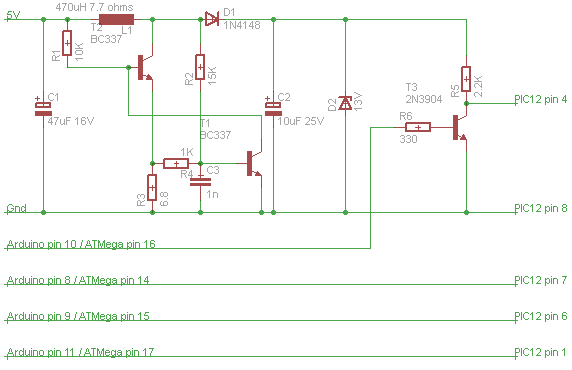
Here's the schematic for the programmer:

To build the programmer, edit the second line of build_programmer.bat to point to your Arduino installation (if it's somewhere other than C:\Program Files\Arduino) and run it. To upload it to the Arduino you'll need WinAVR, modify upload.bat to point to your WinAVR installation and run it. We can't use the avrdude from the Arduino installation here because it won't toggle the line to reset (that's normally done by the Arduino software).

To use the programmer, connect to it with a serial monitor (like the one in the Arduino IDE). There are several one-character commands:

  • W - Write program from Arduino to PIC.
  • O - Write program from Arduino to PIC, including OSCCAL value (necessary if write failed, or if we want to use a different OSCCAL value).
  • P - Write program from Arduino to PIC, including OSCCAL value and backup OSCCAL value - only use if the backup OSCCAL value got screwed up somehow.
  • R - Read program from PIC to Arduino.
  • U - Upload program from PC to Arduino (follow this with the contents of your hex file).
  • L - Download program from Arduino to PC.
  • T - Start timing mode.
  • Q - Stop timing mode.
  • A - Perform automatic calibration.
  • B - Output a nybble to port B (for debugging purposes.)

The returned status codes are as follows:

  • K - Success.
  • EF - Error: config fuses didn't verify.
  • EV - Error: Program, OSCCAL, user IDs or backup OSCCAL didn't verify.
  • ER - Address in hex file out of range.
  • EU - Unknown record type in hex file.
  • EZ - Non-zero byte count in end-of-file marker in hex file.
  • EC - Hex file checksum failure.
  • EH - Incorrect hex digit.
  • E: - colon expected but not received.

In automatic calibration mode, the Arduino also sends calibration information as three numbers per line: OSCCAL value (3 digits), frequency in Hz (7 digits) and standard deviation of frequency in Hz (5 digits).

Don't overdo it with the automatic calibration - it reprograms the PIC with each possible OSCCAL value so you'll wear out the flash if you do it too much.

Final interval bars code (I hope)

Monday, August 8th, 2011

I think I've now got the optimal implementation of the PIC12 code for interval bars. It's gone through many rewrites since my last post on the subject. I decided to get rid of the "heartbeat" after all in favor of a burst system which sends and receives 9 bits (all the information for one bar) at a time every 100 clock cycles or so and synchronizes once in each direction during that period, right before data transmission. This means we can use 3-pin connectors instead of 4-pin connectors. A 2-pin connector isn't really practical since extra electronics would have to be added to separate and recombine the power and data signals.

The downside to this approach is that the microcontroller in the "root" box now has two time-critical tasks - reading the bits as they come in (can't just request one when we're ready for it any more) and outputting audio samples. But I think that is managable, especially if there are queues so that the interrupt routines can just add to or remove from their respective queue and the real work can be done in the foreground. The average data transmission rate is one bar every 317 cycles - the other 217 are spent in the "prime" phase where each bar discovers which bars are connected to it and cycles are broken to turn the graph into a tree. The data rate is about 3,154 bars per second or about 32ms per update with 100 bars - a workable latency for musical purposes.

The program takes 496 instruction slots of the available 512 and 21 bytes of RAM of the available 25. The source file is just 354 lines.

I realized early on that there wasn't going to be space (in flash or RAM) or time for any debugging code so that this program would be impossible to debug on real hardware. I knew I'd never get it right the first time, so it was necessary to write a simulator. There is an existing simulator included with the Microchip tools, but I couldn't get it to work properly and in any case it certainly wouldn't support programmatically randomly plugging and unplugging as many as 100 instances. So I wrote my own cycle exact simulator. Actually it had to be rather better than cycle exact to simulate the fact that the microcontrollers run at slightly different speeds. My simulated timebase is about 39 picoseconds, giving a frequency resolution of about 39Hz - 512 steps between 0.99MHz and 1.01MHz.

After getting the simulator working, I spent a long time cycling through a process that looks like this:

  1. Run the program in the simulator.
  2. Discover that after a while it locks up or produces incorrect results for an extended period.
  3. Look at various diagnostics I added (up to and including full interleaved instruction traces) to figure out what went wrong.
  4. Adjust the program to avoid the problem, and repeat.

Most of the time, a trip through this loop increases the time-to-failure by a factor of between 2 and 10, but occasionally, it's turned out that there was no simple fix to the problem - the program required substantial rewrites to avoid the situation. These rewrites in turn have their own bugs, and the time-to-failure again becomes very small. It got easier, though - the same sorts of problems kept cropping up and I got better at recognizing them with time. Also, at the beginning I kept having to interrupt the cycle to write more diagnostic code when my existing techniques proved insufficient.

With the current version the simulation ran for more than a week of real time (91 hours of simulated time), went through 15,371,546 configurations with a worst settling time of 92ms.

The best version before this one ran for 774430 reconfigurations and 9 hours of real time (about 4.5 hours of simulated time) before getting itself into a state from which some of the bars stopped responding. That problem took a week to track down and because it happens so rarely. The story of how it happens is kind of like a distilled version of a theatrical farce. There is one signal line for communication which can be in one of two states. As the program progresses, signals of different meanings need to be exchanged (there are about 27 different meanings in the latest version). The two communicating bars need to be "on the same page" about what the meaning of a 0 and 1 will be. But because bars can be connected or disconnected at any time, these meanings can become confused. The farce happens when one signal is confused for another and (due to coincidences that would be amazing if I wasn't conspiring to arrange them) this causes a worse confusion later on and so on, escalating until we get to a state from which the system can't recover.

The way out of this mess is by making some of the messages more complicated than a single bit. For example, the "prime" signal which initiates the data transfer is a 6-cycle low, a 31-cycle high and another 6-cycle low. The receiving code checks the line twice (37 cycles apart) for lows and in the middle somewhere for a high. This means that it can't be confused with either the 9-bit data signal (which is at most 36 cycles of low in a row) or for a single long low signal. The response to this is an 8-cycle low, an 8-cycle high and then a low of variable length (in previous versions it was a single long low of varying length). This increases the number of "this can't happen" signals. When we detect one of these we can put the program into a state that is robust against further unexpected input.

A continual battle with this program has been making it as fast as possible whilst still being reliable and fitting in the available space. There isn't enough space to duplicate any significant part of the program for each of the 12 combinations of input and output pin, so I initially divided it up into "read from pin x" and "write to pin x" subroutines. The "write to pin x" subroutines can then be folded together by means of a couple of variables whose values can be written to the IO port to signify a low and a high respectively. Since reading from a memory location takes the same time as loading a constant, there's no cost to this indirection (apart from the setup code which has to initialize these variables depending on the pin we need to write to). The read subroutines can't be factored this way because the bit to read from is encoded in the opcode of the instruction which tests a bit. Using an "extract bit x" subroutine would have slowed the program down too much.

Phew. I think that (per line and per byte) this was the most difficult-to-write program I've ever written. Brian Kernighan is often quoted as saying "Debugging is twice as hard as writing the code in the first place. Therefore, if you write the code as cleverly as possible, you are, by definition, not smart enough to debug it." However, there is a corollary to this - if you write a program that's as clever as you can make it and then force yourself to debug it, you become twice as smart in the process.

Edit 14th July 2013:

LFT said it better than I could.

Rethinking memory

Sunday, August 7th, 2011

There are currently two major ways in which programming languages deal with memory. One is explicit deallocation (as used by C, C++ and assembly language) and the other is garbage collection, which is used by almost everything else.

Explicit deallocation is generally thought of as being very error prone and difficult to get right, but if your language has good features to support it (like destructors in C++) it can be very nearly as easy as garbage collection. It also has some other advantages over garbage collection:

  1. Less actual memory is needed to accomplish any given task (most garbage collected languages need about twice the memory for any given task as a non-garbage collected language).
  2. Non-memory resources can be cleared up in the same way as memory.
  3. Everything is deterministic (which is not the case if you have a garbage collector running on a separate thread).
  4. Most garbage collectors need to pause your program to work, making them unsuitable for hard real-time systems.
  5. Locality of reference is better preserved, leading to more cache-friendly memory access patterns.

Garbage collection also has it's own advantages:

  1. You never need to deallocate memory explicitly - the computer essentially emulates infinite memory for you.
  2. You don't need to explicitly break (or avoid making) cycles of references - the garbage collector will find them.
  3. With a moving collector, allocation can be much faster (requiring just a pointer increment).
  4. If you can always arrange for garbage collection to happen in time that would otherwise be idle, the system can be faster overall.
  5. With a moving collector, memory fragmentation can be avoided.

Generally I prefer explicit deallocation to garbage collection. This might be because my parents drummed it into me as a child that I should put away my toys when I finished playing with them, not leave them lying around to be tidied away my someone else. The one thing that does bother me about explicit deallocation, though, is the possibility of memory fragmentation. Lately I have been wondering if would be possible to fix this problem whilst retaining the advantages of explicit deallocation. Specifically what got me thinking about this is the crazy memory tricks I implemented for my fractal plotter, and how to generalize it to other programs. The result is something I call ravioli allocation (code here although it doesn't actually do anything at the time of writing).

The idea there is that you have a pile of objects which each take the same amount of memory. So there is a simple algorithm for keeping them defragmented - whenever you deallocate an object, move the highest object in memory into the space it vacated.

There are two difficulties with doing this more generally:

  1. To move object X, you have to know where all the pointers pointing to it are so you can fix them up. This caused many long and painful debugging sessions with my fractal program.
  2. All the objects have to be the same size.

The second problem can be solved if the objects are large enough to hold two pointers, by simulating arrays and structures using binary trees (though access time for elements increases a bit - from O(1) to O(log n)).

The first problem can be solved by linking together in a linked list all the pointers which point to the same thing. The list needs to be a doubly linked list because we need to be able to remove a pointer from the list it's in. So, each "high level" pointer really consists of three "low level" pointers - one to the referent itself and two for the previous and next "high level" pointers in the list. An object itself will also need space for two other "low level" pointers - one to the first element of the linked list of pointers pointing to that object, and one to tell the allocator whether it contains 0, 1 or 2 "high level" pointers (this can also be used as a vtable pointer for other purposes).

To avoid splitting objects across cache lines, we want the size of each object to be a power of two, so they will need to be able to hold 8 "low level" pointers (i.e. be 32 bytes on 32-bit systems, 64 bytes on 64-bit systems). That means that each 32-bit object can store 6 32-bit integers or 24 characters. On a 64-bit machine, an object could store 12 32-bit integers or 48 characters. So the small string optimization is very natural with ravioli allocation.

Once we have the ability to move objects around for defragmentation purposes, we might want to move them around for other purposes too. For example, if we expect that whenever object A is used, object B is also very likely to be used (and vice versa) we might want to put them on the same cache line. We can also set up separate memory arenas for separate purposes and move objects between them to improve locality for paging purposes.

One big downside of this system seems to be that deallocation (or moving an object in general) can be quite an expensive operation - chasing one pointer (and one potential cache miss) for each pointer that points to the moved object. However, I suspect that this wouldn't be as expensive as it sounds most of the time, since the objects that we move will tend to be ones which were allocated recently (since they will be in higher memory locations) and won't have been around long enough to have accumulated too many pointers. The objects that tend to have a lot of objects pointing to them will tend to be long lived and will migrate towards the beginning of memory (even if they don't start off there). However, walking this linked list should probably be done with non-temporal loads to avoid polluting the cache with a bunch of objects that you don't really care about. Also, consider the average case - each object can only point to two other objects, which means that the average number of pointers pointing to an object will be at most 2. And there is the nice property that a routine which doesn't deallocate data that it didn't allocate, also won't move data that it didn't allocate, so performance of small routines can be quantified nicely.

There is a fair bit of overhead to all these linked lists - 44% in the best case (one big array) and 300% in the worst case (a linked list of small records). However, some of this is offset against existing overhead (heap information, vtable pointers, fragmentation, existing binary tree pointers, reference counts[1]) so for real programs the costs might be much smaller or even negative.

Multithreading might seem to be a problem at first - one thread can't hold on to a pointer to an object in another thread's heap. However, you can transfer data to or from another thread if the other thread is in a known (waiting) state. You have to be careful transferring data between threads, but that's true anyway.

Local (stack) variables present a bit of a problem - they can't hold pointers (unless you walk the entire stack looking for pointers whenever you deallocate something). One way would be to store "how to get there" (from a global root object which is allocated first and never moves) instead of "where it is" on the stack. Another would be for the stack itself to be allocated on the heap. This is probably the faster solution, and has some nice implications for implementing things like arbitrary closures and continuations. Hardware support would definitely help here though.

[1] There is a nice synergy between ravioli allocation and reference counting - whenever you change a pointer you remove it from its linked list, and if the linked list then contains zero entries you know you can remove the object you just stopped referencing. Cycles must be explicitly broken, though - you can't have a raw/weak pointer (because it would go stale when the object it referred to moved).

Edit 14th July 2013:

Here's a good rant against garbage collection.

Musical toy design

Tuesday, July 20th, 2010

I've been thinking about how to create the interval bars instrument/toy as a sort of sequel to the physical tone matrix. Here's some of the design space I've explored.

First I wondered how we could sense the relative position of each bar in space. I fairly quickly decided that putting a tiny microcontroller in each of the bars would probably be the best way. The root box queries the bar it's connected to, which then sends back its length, orientation (i.e. which of the 4 connectors it is being queried through) whether its switch is being touched or not. This bar then performs the same query on the bars connected to its three other connectors, sends this information back to the root and so on, walking the tree. A program to transmit a few bits of data, walk one node of a ternary tree and then pass back another string of bits sounds very simple, but as we'll see there are a lot of complications.

The first microcontroller I looked at was the cheapest one I could find, the PIC10F200. This thing is seriously cheap and seriously tiny (both physically and software-wise). It has 16 *bytes* of memory (same as a single SSE register), runs at 4MHz and can run programs that are up to 256 instructions long. It also costs just 30 cents in large quantities. I thought it would be an fun programming challenge to fit such a simple program into such a tiny space.

Unfortunately, I failed in this endeavour because the PIC10F200 only has 4 IO pins (6 pins altogether - the other two are power and ground). Only 3 of them can be used for output. I needed at least 5 pins - one for each directional connector and one for the switch. I tried to figure out some way of addressing each direction with a unique pair of IO pins but couldn't figure out a scheme that would actually work.

So then I decided to go for the next PIC up, the PIC12F508. This has 6 IO pins (perfect), 512 instructions, 25 bytes of RAM and costs $0.41 in large quantities. I bought a pile of them. The PIC16F54 is even cheaper ($0.39), has 12 IO pins and runs up to 20MHz but has no internal oscillator.

I originally figured that I would drive all the PICs with a single external clock to make it easy to keep them in sync. However, I discovered a major problem with this approach - these microcontrollers don't have a external clock oscillator mode. You can use the internal oscillator, an external crystal or an external RC timebase. It might be possible to use an external clock in EXTRC or XT mode but it's out of spec, might damage the microcontroller, might be unstable, might degrade the clock signal and might cause one of the other IO pins to be unavailable. Also, even with cycle exact code there is complexity in the timing because each instruction takes 4 or 8 clock cycles, and you can't control which of the 4 phases you get.

So I decided to use the internal oscillator. It's factory calibrated to +/- 1% so I should be able to synchronize two PICs just by adding appropriate delay loops, making sure that signal pulses are long enough to cover all the possible times when they might be read, and that the reader waits until the pulse is certain to have started before attempting the read. Programming in cycle-exact assembler is difficult enough when there's only one CPU to worry about, but when you're writing code that's going to run in sync on two CPUs and all timing is done by cycle counting and the CPUs have slightly different clock rates it's a nightmare!

The first version of my program took too much space (everything was unrolled and I had different code paths for each orientation). I got it to fit by moving some of the code into subroutines (you have to choose which code you put in subroutines carefully, since the stack only has two levels) but didn't have much space for delay loops.

So I rewrote it to avoid storing the "which port is the parent" and "which port is the child" information in the program counter. Now it only checks this information when reading from or writing to a pin, or checking all the pins to see which direction a signal will come from first. Takes less than half of the available space - brilliant.

The next problem is that only two microcontrollers can be communicating at once (one talking, one listening). If three are trying to communicate at once, eventually the middle one is going to face a time when it has to talk to both of the other two within a certain amount of time, and won't be able to satisfy the conflicting demands. So when a microcontroller is getting a bit of data from a child, it has to tell the parent to wait and we can't have a "bucket brigade" of bits. This means that we get quadratically slower as we get further from the root. Counting the cycles, I realized that (even before all the delay loops had been added) we were outside of our cycle budget to get a reasonably small latency.

To get the "bucket brigade" back, I realized that we had to have a way to synchronize all the microcontrollers at once. We can't use an external cycle clock for this but what about a much slower "heartbeat" signal shared between all the microcontrollers, coming in on the spare pin?

The idea is this: each microcontroller has a state variable. On each heartbeat, each microcontroller jumps to a subroutine corresponding to its state. This subroutine reads the pins set in the previous cycle, sets output pins for the next cycle and updates the state variable for the next cycle before going back to waiting for the next heartbeat. All the waiting is done at once, and we no longer have the precise timing difficulties we have before - as long as we have rules like "how late you can read the inputs", "how early you can set the outputs" and "how long the heartbeat can take" everything should work out just right. I think we can get much better performance with this system.

The musical toy is really about melody and harmony, but under the covers it's rhythm that makes it work.